The latest Cloudlocker release makes it easier than ever to store, search, and export email and legacy file archives.
From deeper user management controls to a more intuitive export experience, we built the newest features to save time, reduce friction, and advance our customers’ archiving and eDiscovery capabilities.
Cloudlocker Update: What’s New
👥 More Customization & Control
Cloudlocker focuses on giving users full control of their data, and that now extends to increasing their control over the platform. Account administrators can now easily add and remove users to the Cloudlocker platform. We’ve introduced custom roles and permissions. Admins can customize user access, defining exactly what each user can access within the platform.
Plus, our new Matter Isolation feature is perfect for organizations handling multiple legal or compliance matters simultaneously. Matter Isolation gives you granular control over which users can access which matter, ensuring sensitive data stays in the right hands at all times.
📦 More Exporting Options
Getting data out of Cloudlocker has always been simple, but now we’ve added more options.
You can now export directly to PST — one of the most widely accepted formats for email archive delivery, making downstream review and processing significantly smoother. Users now have the option to export with or without journal envelopes, giving legal and compliance teams the flexibility to match their exact processing requirements.
Additionally, Cloudlocker now features improved integration with the updated Microsoft Purview Suite, ensuring your archiving workflows stay seamlessly aligned with Microsoft’s evolving compliance ecosystem.
Export options include:
- Direct exports into a zipped folder containing EML files
- Direct exports to PST
- Secure upload to RelativityOne workspaces
- Export to Azure Blob Storage
- Export to Azure Blob Storage
- Direct exports to Microsoft Purview
- Purview eDiscovery suite (updated 2025)
- Microsoft Purview eDiscovery (Premium) (retired 2025)
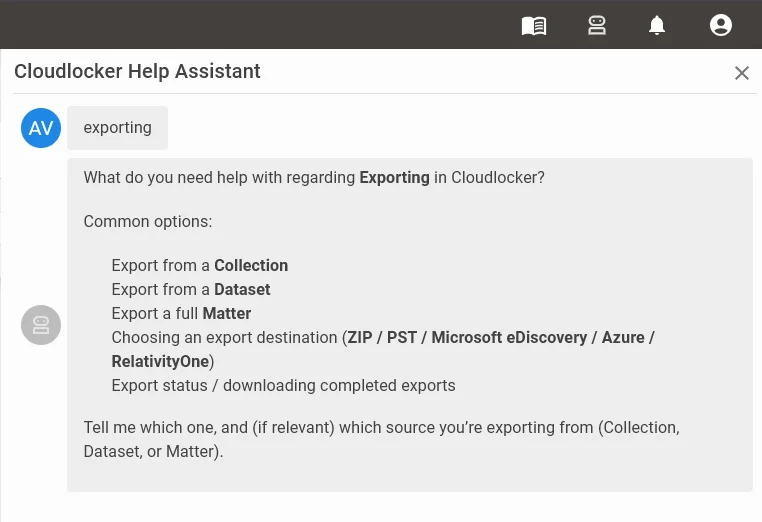
🤖 Cloudlocker Help Assistant
Say goodbye to digging through documentation and overusing Ctrl+F to search for the answers. The new Cloudlocker Help Assistant is an AI-powered interactive chat that connects directly to the Cloudlocker knowledge base, letting you ask questions and get answers instantly — in plain language.
No more scrolling through help articles trying to find that one setting. Just open the assistant, type your question, and get the answer you need. Whether you’re onboarding a new team member or troubleshooting an edge case at 11pm, the Help Assistant is always available.
It’s contextual, conversational, and built specifically for Cloudlocker, with accurate, relevant, and actionable answers relevant to your actual workflow.